Computer vision is the field concerned with extracting information from images and video sequences. Within a business application, its output may be a category, a region containing an object, an area defined at pixel level or text recognised within a document. Its usefulness follows the operation that information supports, rather than simply the presence of a camera.
For a warehouse, the question may be whether a parcel is present in an inspection area. For a document-processing team, the requirement may be text from a scan. For a catalogue, the task may involve classifying product photographs. These are different projects with different data, outputs and evaluation requirements, even when they all begin with an image.
This guide uses our own proposed parcel-checking scenario and demonstrative diagrams. It does not report results from a detector deployed for a customer. Photographs show warehouse work, paperwork and connectivity; explanatory outlines are drawn separately in code, without modifying photographs or attributing AI performance to the people illustrated.
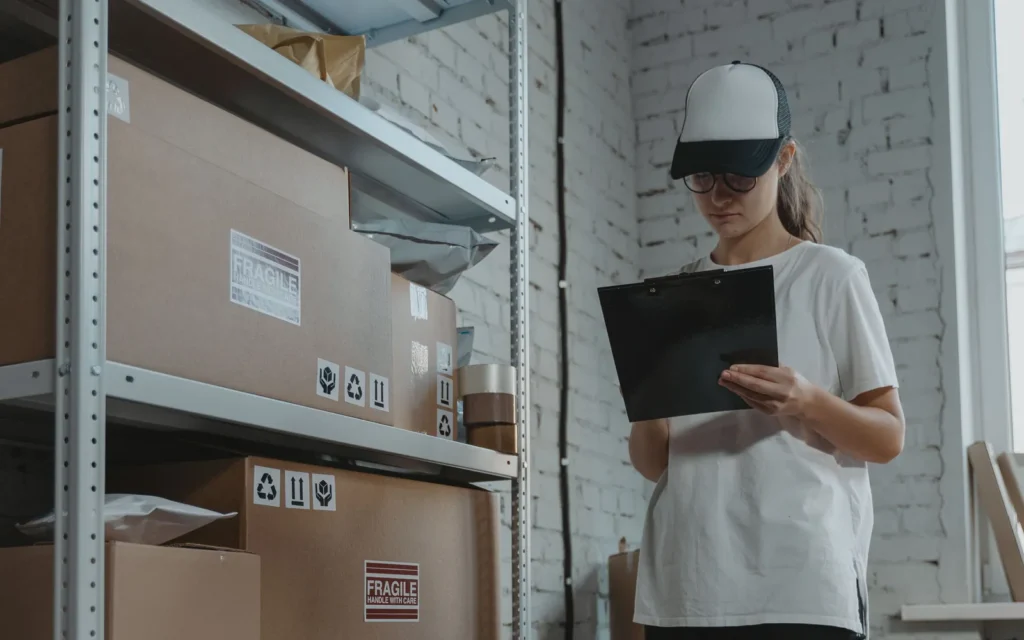
What is computer vision and how does it relate to AI?
Image analysis includes classical methods and models learned from data
A digital image contains pixel values, not a ready-made inventory of objects and relationships. A vision system computes representations and outputs suited to the task. It can use geometric operations, visual features and rules, machine-learning models or a combination. Computer vision is not another name for a single neural-network architecture, and its components should be chosen for the required output.
Our guide to types of artificial intelligence distinguishes technology from task. A model interpreting images and text may belong within a visual application, but a conversational interface does not itself establish localisation or reading quality. The project needs a precise output definition and reviewed examples against which the actual function can be assessed.
Choose the required output, not just the computer-vision label
- Classification
A label for the analysed image or region.
- Detection
Individual objects, classes and localised regions.
- Segmentation
Classes or instances associated with pixels under the project schema.
- OCR
Text recognised within an image, then separately checked and processed.
In our scenario, a camera observes a receiving area. We define what counts as a parcel, when it is observed and what should be shown to the operator. The model is not asked to decide every event within the warehouse. Start with information needed by a bounded activity and the circumstances requiring review, rather than treating an entire scene as an unrestricted automation task.
Classification, detection and segmentation: how do outputs differ?
An image label, an object's rectangle and pixel boundaries answer different questions
Classification assigns a category to an image or analysed region. Detection proposes individual objects, classes and locations, often represented by rectangles. Segmentation assigns classes or instances to pixels, according to the task. TensorFlow documentation explicitly distinguishes image classification from pixel-level segmentation; the appropriate choice depends on the information the application actually requires.
Original schematic: objects and their regions are not the same thing
- A
- B
- C
A parcels-present label does not automatically provide their number or positions. Several rectangles may describe overlapping objects, duplicates or different parts of the same scene. The application must understand the output and how to turn it into a reviewable result. Object counts and event counts are different measurement units, particularly when an item appears repeatedly in a video.
Semantic segmentation groups pixels by class, while instance segmentation distinguishes individual objects within a class. A workflow requiring only parcel presence may not need a detailed mask. For measuring a visible area, a rectangle may include too much background. Process requirements determine the appropriate representation, rather than a presumption that a more detailed output is always preferable.
How does a system turn pixels into an output?
A visual representation is one component, not the whole commercial process
Classical methods can compare shapes, edges, keypoints and other computed properties. OpenCV documentation describes keypoint detection and visual descriptors, for example. Those mechanisms differ from assigning a semantic object class. Do not assume every operation on an image requires training a deep model; a bounded task should be compared with a suitable simpler approach.
In deep-learning applications, representations are learned from data during training. During use, the model applies its parameters and defined transformations to produce output. A new prediction does not mean the system automatically retrained on the image it just received. Training and inference have separate procedures and resource requirements, which belong in the project specification.
A multimodal model may describe an image using natural language. For an integration, request the required output, check its correspondence with the image and measure task-specific errors. A fluent explanation does not replace correct localisation, exact text recognition or an authorisation rule for the final operation. Those requirements need their own checks and observable evidence.
Why do camera placement and capture conditions matter?
Test information available in the real scene, not an isolated ideal image
For our warehouse scenario, we propose a defined observation area and known camera position. Check lighting, reflections, distance, movement and objects obscuring each other. If the required detail is not visible, changing the model does not replace suitable capture conditions. Discuss that requirement alongside the physical workflow, including any changes operators would have to make.
File resolution alone does not describe visibility of the relevant object. A small parcel within a very wide scene may occupy little useful information. Resizing, cropping or compression before analysis must be tested for that object. Retain the processed representation's settings in the configuration record so that the evaluation can be reproduced instead of relying on an unspecified original image.
For video, define observation timing and the latency the process can accept. Output arriving after an item has passed may be correct for an image but unsuitable operationally. Missing frames, a disconnected camera and delayed processing are distinct technical states. Do not record them as evidence that an area was empty or an object never existed.
Include difficult conditions expected in the activity: reflective packaging, partially covered labels and nearby objects. Do not require an operator to quietly change the workflow to assist a demonstration. If controlled capture placement is necessary, make it an explicit requirement and discuss its effect on working practices before deployment, rather than discovering that dependency after acceptance.
What data and labels are needed for evaluation?
Define objects and data separation before comparing alternatives
Prepare authorised images covering project conditions. The annotation guide defines classes, object boundaries and exclusions. Reviewers examining the same scene should apply the same definition of a parcel and its region. Resolve annotation disagreements rather than leaving a model to absorb them into an aggregate score, where inconsistent reference labels would make errors difficult to interpret.
Turning a visual problem into a pilot
- 1 · Capture
Define scene, camera, lighting and observation unit.
- 2 · Reference
Label authorised data using the same output definition.
- 3 · Baseline
Compare rules, classical methods and a task-appropriate model.
- 4 · Separate test
Check relevant classes and conditions without mixing data sets.
- 5 · Operational flow
Define review, event and permitted operation.
In supervised learning, labelled examples support learning and evaluation, but the test set remains separate. Near-identical frames from the same sequence can make comparisons overly favourable when split carelessly. Choose separation according to the scenes, periods and variations that the project needs to test, rather than treating every frame as an independent observation.
Augmentation transformations can vary training examples within realistic task boundaries. They do not automatically supply independent observations of every field condition. Check whether a transformation preserves the label's meaning and required geometry. Rotated text or a cropped region may alter precisely the information being recognised, so generated variations still need a clear relationship to the intended task.
The annotation guide states how to handle partially visible objects, open boxes and objects outside the tracked classes. Boundary examples help reviewers apply the same rule. Give cases outside project scope a clear state rather than forcing a label just to complete the output. This distinction remains useful when the system is assessed on new operating conditions.
How do applications use OCR and object tracking?
Text, movement and identity are different outputs
OCR extracts text from an image. For documents, the next stage may involve entity recognition and information extraction, followed by validation. Reading a company name does not automatically identify its CRM record, and reading a date does not establish its role. Geometry and reading order can matter just as much as the recognised string.
Tracking follows regions or objects across frames. The MultiTracker example in OpenCV documentation demonstrates initialising regions and updating them through a sequence. That concept differs from recognising a person's identity. The objects in this guide are parcels, with no biometric functionality or employee assessment. A project's scope should make these boundaries explicit rather than introducing unrelated uses through a general vision label.
Counting may require a rule confirming passage through an area rather than adding detections from every frame. The same parcel can appear repeatedly. Define when an event starts and ends, how temporary loss of tracking is handled and which cases go to an operator for review. This connects frame-level information with the activity the company actually needs to record.

How do we evaluate computer vision without misleading comparisons?
Read each metric alongside its task, threshold and test conditions
For classification, examine correct classes, misses and false alarms. Detection also requires localisation. Intersection over union, or IoU, geometrically compares a proposed region with its reference. The protocol specifies thresholds and matching rules, including treatment of duplicate proposals. A percentage without those conditions does not fully describe a detector's output or establish that it suits the business task.
What to declare when reporting detector results
- Class
The expected object and the definition of exceptions.
- Localisation
How the proposed region is compared with reference; geometric criteria are explicit.
- Threshold
The accepted score and resulting misses or false alarms.
- Protocol
Test data, matching rules, duplicates and the calculated metric.
TensorFlow's detector-evaluation documentation distinguishes protocols and metrics such as AP and mAP. These differ from precision measured at one score threshold. A fair comparison uses the same data, classes, processing conditions and rules. Do not transfer a public dataset's reported performance to the company's camera without the relevant test, or compare scores calculated using different matching conventions.
Review small objects, movement, difficult lighting and relevant packaging types separately. Also assess operational consequences: correctly confirmed events, review effort and operations appropriately stopped for checking. A correct frame-level prediction is not automatically a correct commercial event. An omitted region should remain visible in the error analysis rather than disappearing inside a favourable overall average.
How do we connect visual analysis to inventory, CRM or business software?
Detection proposes information; the application applies rules and checks effects
The integration receives output with its time, source and relevant configuration. Process rules decide whether to display an alert, prepare a proposal or request an operator's review. For business automation with AI, the specification explicitly separates observation from the authorised operation. This prevents a model's visual output from silently acquiring permissions it was never intended to have.
In our proposed scenario, parcel presence may initiate a check but does not itself change stock. The system must associate the object with the appropriate operation and respect user permissions. A model score is not approval for a change, nor certain identification of products inside the packaging. The application needs evidence appropriate to the record it intends to update.
Saving requires duplicate protection and confirmation of the resulting effect. If the same observation arrives repeatedly through an integration, the operation must not multiply. Errors, delays and inconclusive results need clear states. Operators can see what was observed, what was proposed and what actually changed in the destination system, making reconciliation possible when a connector returns an uncertain outcome.
What should we monitor after launching a vision application?
Capture, model and final operation each require their own controls
Google recommends monitoring differences between training and serving data and transformations. Apply that distinction to the pilot: a moved camera, new packaging or different image processing calls for reviewing affected cases. Retain configuration versions and reference comparisons rather than quietly changing thresholds. The team should be able to identify which operating conditions and settings produced the current result.
Four distinct things to monitor in operation
- Available capture
Valid image, connected camera and observation time.
- Known configuration
Versions of model, rules and transformations used.
- Reviewable output
Prediction, exception and evidence relevant to the operator.
- Controlled effect
Confirmed event and execution within approved limits.
When designing data protection for an AI application, define necessary images, access and retention of review evidence. Do not automatically collect an entire video activity history when the process needs only bounded observations. Interfaces and exports apply company access rules, including who may inspect a supporting frame or download a set of records.
Measure resources on the actual configuration: capture and preprocessing time, transfer, inference and integration response. Choose local or remote processing according to these requirements and the data flow. Do not assume every real-time analysis needs identical hardware or hosting architecture. The evaluation should include the complete response path rather than only a model's isolated inference time.
How do we choose a first computer-vision project?
Begin with an observable, repeatable task and an owner able to check its outcome. Establish error costs, available data and a baseline. A code reader, geometric rule or capture change may suit a bounded requirement better than a complex model. The comparison should leave room for that outcome rather than assuming an AI component must be selected.
The pilot includes normal conditions and exceptions, then compares technical results with real work. An operational reporting dashboard can show valid observations, exclusions, reviews and confirmed events. Make denominators visible: do not report only cases where both camera and model happened to return a convenient result, while omitting unavailable or difficult observations.
Before expansion, the company receives acceptance criteria, identified errors and an operating procedure. Changes to camera, format or model are checked on relevant cases. This sequence allows improvement of the component limiting the process without turning every issue into a complete solution replacement. It also keeps the operating team informed about changes that affect interpretation of results.
The business comparison includes human review, capture maintenance, processing and integration, not just prediction time. Track work actually simplified and errors still requiring intervention. A pilot should support an informed decision about the proposed workflow, with responsibilities and operating conditions visible to the team, rather than merely producing an attractive image with coloured rectangles.
How does WebHat approach an image- or video-based application?
We start with the process rather than a demonstration chosen for visual impact. Define input, output and final operation, then review authorised data and the existing integration. The specification distinguishes functions implemented in the pilot from proposed extensions and identifies who validates cases affecting company records. This creates a clear basis for testing and acceptance.
For custom applications with AI integration, we can design capture flow, analysis service, review area and connections to company systems. Component selection follows test outcomes and operational requirements. Explaining errors clearly matters as much as showing a successful example, because the application must support daily work beyond the particular frame used in a demonstration.
For a useful discussion, prepare image types, scene, desired output, observation frequency and the information's destination. Also specify what should happen when an image is missing or output requires review. These details allow a concrete pilot and appropriate integration path to be estimated for the business activity, with capture and control requirements considered from the outset.
Frequently asked questions about computer vision for business
Is every image-analysis task deep learning?
No. Computer vision also includes classical methods based on geometry, visual features and rules. A learned model is chosen when it contributes to the tested requirement. A project may combine different approaches for distinct stages of the same workflow rather than selecting a single technique for every operation.
Does classification tell me how many objects are in a frame?
An image-level label does not automatically supply object counts and positions. Evaluate detection or another appropriate method for that requirement. Counting events in video also requires an event definition and treatment of repeated appearances, so that multiple frames showing the same item do not automatically become multiple commercial events.
Does parcel tracking also identify people in the images?
These are separate tasks. This guide describes following object regions across frames, not identifying people. Biometric functions and their uses require a distinct assessment of purpose, data and applicable conditions before any implementation proposal. They are not implicitly included in the parcel-checking scenario described here.
Can we use the existing camera?
Check its position, visibility of details, technical access and capture conditions. Testing representative data shows whether the available input supports the task. A camera's advertised resolution does not replace assessment of the actual scene, including movement, obscured objects and the size of relevant details.
Must every image be sent to an external service?
The architecture may use local or remote processing depending on model, hardware, latency and data rules. The workflow defines what is transferred and retained. This decision belongs to design and evaluation rather than being an identical requirement for every visual application or every type of image analysis.
What should we receive from a pilot?
The task definition, tested data and configuration, results under relevant conditions, observed errors and review procedure. The report also explains the final integration: what information the system proposes, who approves it and how its operational effect is confirmed. This makes the result usable beyond the demonstration itself.