
Completed project · Operational CRM

CRM for the Ramada SPA

Pool activities at the Ramada Plaza hotel SPA · Bucharest

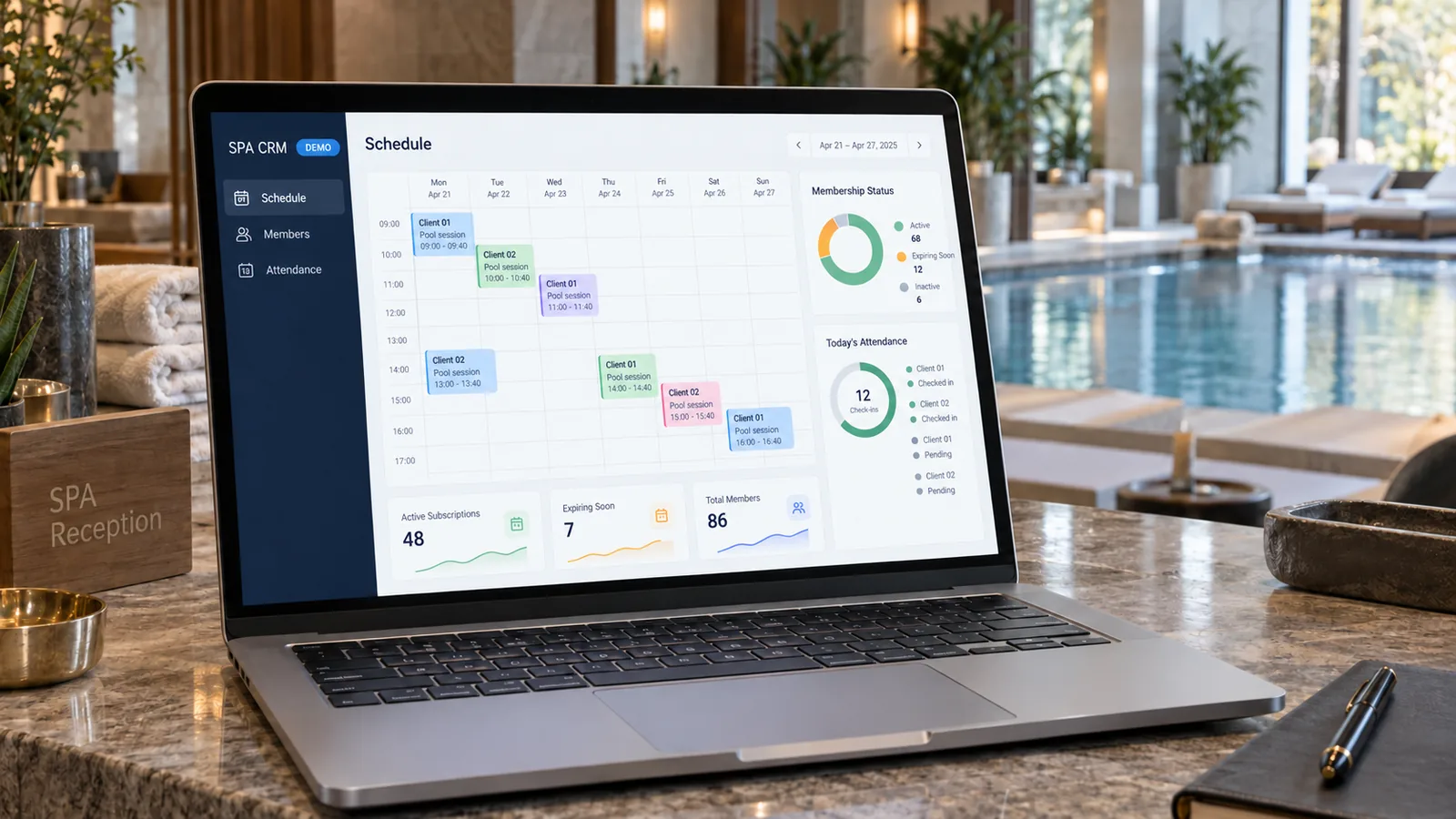
Custom CRM for enrolments, memberships, bookings, attendance and payments. Participants, packages, coaches and sessions are connected in one operational workflow.

Distinct portals for management, staff and clients, with location-based permissions. An independent web application with actual bookings and retained history.

Memberships and bookings Client and coach portals Role-based access PHP + MySQL

What we built

Client relationships and pool operations in one system

A membership provides a number of sessions within a defined period and under specific conditions. A booking reserves a time slot for a participant and a coach. Attendance records what actually happened. The CRM connects these layers so that a schedule change is not mistaken for a completed session or a received payment.

Enrolments and participant profiles

Public and internal forms collect requests through the same workflow. Children and adults are handled distinctly, with the guardian recorded separately from the learner. Members of the same family can have their own profiles without uncontrolled account duplication.

Memberships, bookings and attendance

Packages retain their validity period, sessions and selected schedule. Recurring sessions become actual bookings, and attendance updates the balance through the same central mechanism. Rescheduling and corrections retain the connection between the original and active time slot.

Staff, capacity and location-based access

Coach schedules, groups, availability and operational exceptions are assessed together. Access is linked to the user's responsibility and location. The same coach can coordinate one pool while having coach-only access at another.

Payments, discounts and reporting

The application distinguishes requested amounts from confirmed receipts and retains the connection to the request or membership. Coupons have conditions and usage limits. Reports track bookings and actual activity, while notifications complete the operational workflow.

Functional architecture

Three workspaces, one source of data

The public website and CRM have different responsibilities. The operational application runs separately, while enrolment, authenticated portals and the administration dashboard use the same rules and CRM database.

Enrolment and client portal

The interface for submitting a request and following one's own membership.

  • Package, schedule and participant
  • Own data and requests
  • Guardian and learner relationships
PHP/MySQL operational core

Shared rules, entity relationships and the current state of data.

  • Memberships and actual bookings
  • Validation and transactions
  • Payments, discounts and logs
Administration and coach portal

Working tools are available according to role and location.

  • Schedule, capacity and attendance
  • Approvals and controlled interventions
  • Reports and notifications
The CRM connects different workspaces without creating parallel records for memberships, attendance or payments.
1

Owner and club administrator

Coordinates operations and staff. The Owner's sensitive permissions remain distinct from operational administration: integration settings, account control and actions with wider impact.

2

Operations manager

Works with enrolments, memberships, schedules and attendance at authorised locations. This role can also be granted to a coach, but only for the pool where they hold that responsibility.

3

Coach

Views their own activity and can submit requests concerning schedules, availability, leave or rescheduling. Their portal does not automatically provide administrative control over the entire client database.

4

Client or guardian

Accesses information and requests associated with their own account. Family participants have distinct profiles so that one child's membership and history cannot be confused with another's.

5

Read-only operator

Views permitted operational data for assigned locations without permission to modify it. Read-only access is separate from a manager's responsibilities.

Enrolment workflow

From a request to membership and completed sessions

The client selects the location, package and available schedule. The request enters review; it does not automatically become a payment receipt or a completed session. Approval connects the participant, membership, bookings and payment status.

Enrolment and participant identification
Select the package, coach and schedule
Check availability, capacity and conditions
Operational decision and confirmation
Approved request Membership and actual bookings

Conversion links the request to the membership, schedule and related payment. Future sessions can be followed in the calendar and operational records.

Schedule needs adjustment Recheck before confirmation

A changed slot or assignment requires availability to be reassessed. Permitted operational exceptions require a warning and explicit confirmation.

Uncompleted request Status and history retained

A rejected or closed request is not treated as an active membership. The decision remains traceable without artificially generating attendance or receipts.

After activation, attendance updates sessions through central functions. Rescheduling preserves the history of the changed slot. Renewal is checked against the current state so that an old request or duplicate submission cannot create two identical operations.
The enrolment workflow connects to daily operations: membership, booking, attendance, balance and history.

Technical decisions

Consistent data when several people work in the same CRM

The project's complexity lies in shared rules: what each role can change, when a session is deducted, how the schedule is checked and how concurrent requests are handled. The features described concern aquatic activities; the application is not presented as a room-booking or SPA-treatment management system.

Independent of WordPress

The application runs on PHP with MariaDB/MySQL and HTML/CSS/JavaScript interfaces. The CRM has its own infrastructure, configuration and database, separate from the public website. Operational logic is not moved into presentation pages or WordPress plugins.

Server-verified permissions

Hiding a button is not considered sufficient access control. Actions verify the user, role and location context. Viewing, operating and sensitive administration are separated; a role change can revoke previous sessions and access.

Real scheduling with availability and capacity

Bookings account for the coach, time slot, package and activity type. Individual and group sessions are managed with recurring schedules or selected times. Confirmable exceptions are distinguished from invalid data and conflicts that must be blocked.

Concurrent-operation safeguards

For sensitive changes, the server rereads the current state and uses transactions, locks and form revisions. A window left open must not overwrite a later change or deduct or restore the same session twice.

Consistent payment and discount relationships

A payment remains linked to the same underlying transaction when a request becomes a membership. Two-participant packages can have distinct memberships and one shared payment. Ambiguous situations are flagged for review rather than automatically recorded as receipts. CRM records do not replace official accounting.

History, notifications and operational reports

The log tracks who changed bookings, memberships and access. Notifications are retained in an outbox with controlled delivery and reminders. Reports are based on actual activity and bookings, distinguish planned sessions from attendance and retain relevant history.

WebHat experience

Software built around the rules of a real operation

The project demonstrates WebHat's process-modelling experience, not just screen design. We connected entities that change together — participant, membership, coach, booking and payment — while preserving staff responsibilities and operation history. The same discipline can be applied to a CRM for services, education or activities with bookings and limited resources, after analysing their own rules.

  • Enrolments and profiles connected to operations
  • Consistent memberships, bookings, attendance and balances
  • Distinct access for staff, clients and locations
  • Transactions, auditing and current-state checks
  • Independent application for mobile and desktop